Sign Up Process

Guidelines of Sign Up
One can become a member of Biz 360 Expo Digital Platform by following the Sign Up process. Those interested are requested to read the "Guidelines" carefully.
1.
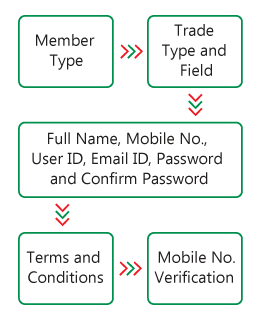
Sign Up can be completed in three steps. The sequence of steps is shown in the diagram beside.
2.
There are two types of member – Commercial Member or Individual Member.
3.
Individual members are persons such as professional, specialist, consultant, entrepreneur, engineer, lawyer, working staff etc.
4.
Commercial members are business entity, organization, association, council, club, industry, shop, market etc.
5.
Fill in member information – Active Email ID, Mobile No., Password and Confirm Password.
6.
Provided Email ID will be the Username to access Biz 360 Expo digital platform.
7.
Password is limited to English letters, numbers and special characters. Password must contain at least one English letter, one number, and one special character.
8.
A verification code will be sent to Email ID, which must be inputted in the last step. This code will remain active for 3 minutes.
9.
If the code verification is correct, a Sign Up confirmation email will be sent to Email ID of the member.
After login, the members need to fill in Full Name / Business Name, Logo, Contact Address, Preferred Web Address associated with Biz 360 Expo, Trade Type (Seasonal or Regular Trade), Field, Sub-Field etc. in their profile.
For any problem (such as not getting Verification Code, fail to finish Sign Up etc.), please contact to our Support Team.